EN
EN DE
DE ES
ES FR
FR NL
NL PT
PT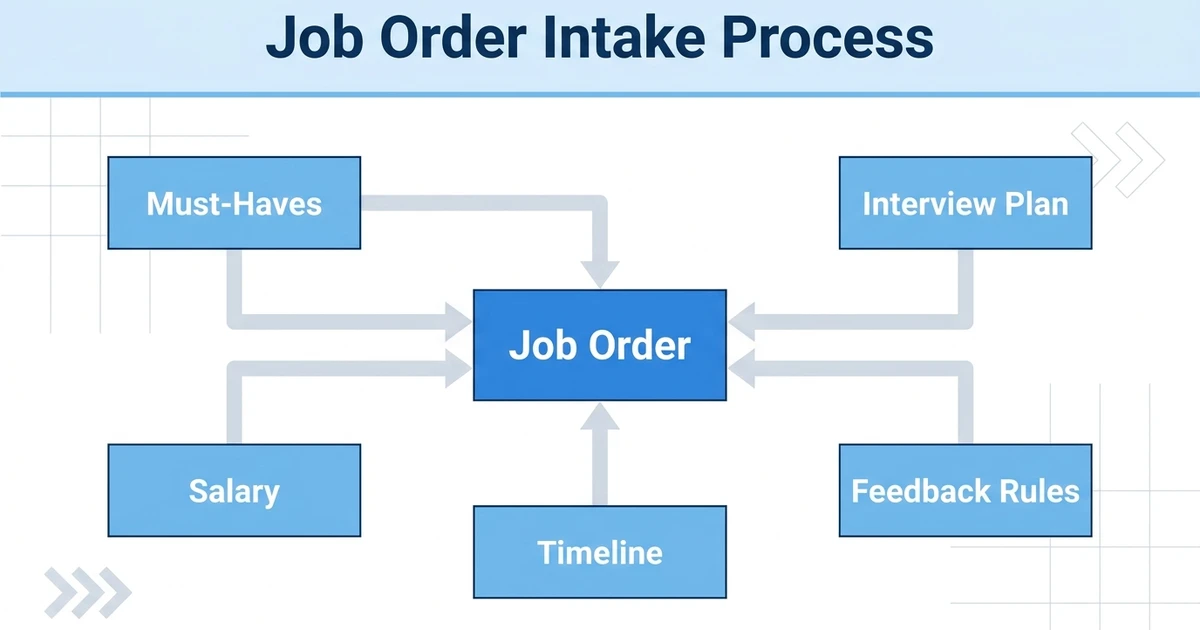





Quick Answer: Job order intake process helps agencies turn scattered work into a clearer operating rhythm. It gives recruiters, account managers, and leaders a shared way to see what happened, what should happen next, and where revenue or delivery risk is starting to build.
Job order intake process is easy to ignore when the desk is busy. Recruiters can still send emails, add candidates, chase clients, and move jobs forward without stopping to redesign the process. The problem is that growth exposes every weak handoff. A note that made sense to one recruiter becomes unclear to the next person. A client promise gets buried in an inbox. A candidate who should have been easy to rediscover disappears behind weak tags or duplicate records.
This guide explains how to build the workflow, what to track, which software capabilities matter, and how to keep the process useful for real agency work rather than turning it into another admin exercise. Recruiters often lose time because the role was never qualified properly: unclear must-haves, weak salary alignment, slow client feedback, or no agreement on what a good shortlist means.
Why the job order intake process decides search quality
A search does not start when a recruiter opens LinkedIn. It starts when the agency understands the role well enough to decide whether the search is workable, urgent, and worth prioritizing.
For agencies, the risk is rarely one dramatic failure. It is the slow accumulation of small gaps: a client conversation not logged, a candidate profile not updated, a job stage that means different things to different people, or a deal that stays open long after the buyer has gone quiet.
SHRM notes that recruiting teams are investing in AI and automation to improve candidate flow and reduce friction in the hiring process SHRM guidance on recruiters as strategic talent advisors. That is useful context, but software only helps when the underlying workflow is clear enough for the team to follow.
A better process gives your agency three advantages:
- Recruiters spend less time rebuilding context before taking action
- Account managers can see client movement without chasing internal updates
- Leaders can coach from evidence instead of anecdotes
- Candidates and clients get a more consistent experience across the team
The aim is not to make every recruiter behave like an operations analyst. The aim is to make the right action easy at the right moment.
What every job order intake process should clarify
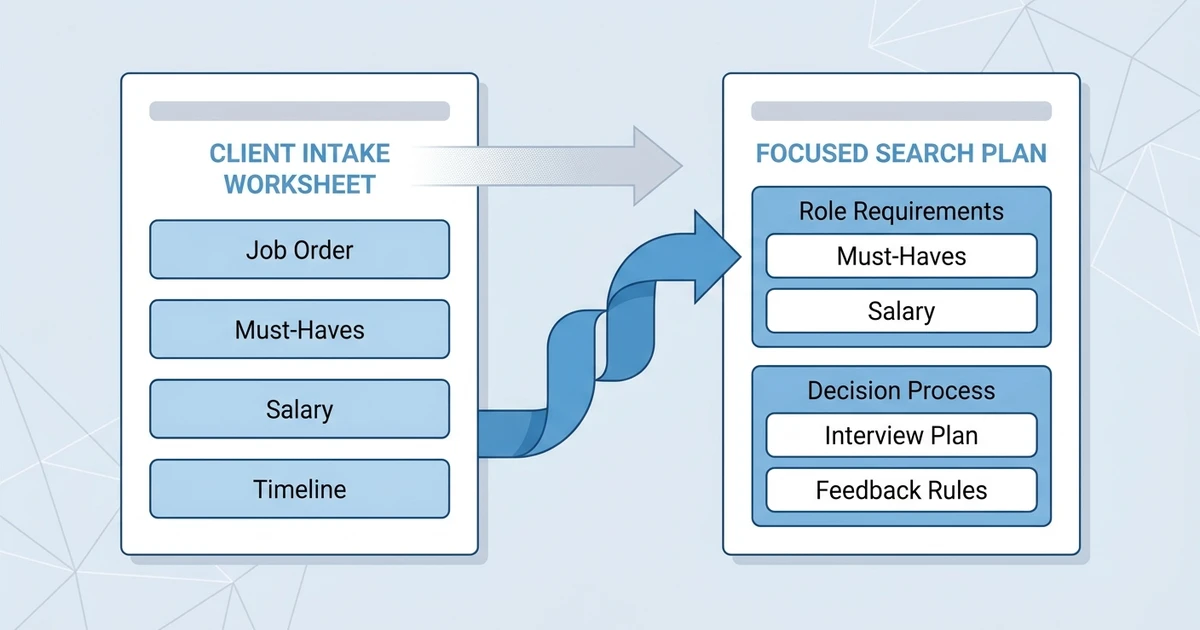
The intake should cover business need, must-have skills, salary range, deal terms, interview steps, urgency, client responsiveness, hiring manager preferences, and submission expectations.
A useful setup starts with the records that drive agency revenue. Candidate records, client contacts, job orders, submissions, interviews, deals, and placements should not behave like separate filing cabinets. They should tell one story.
| Workflow area | Weak agency setup | Strong agency setup |
|---|---|---|
| Ownership | One person remembers the context | Records show owner, activity, and next action |
| Visibility | Updates live in inboxes or spreadsheets | Updates connect to candidates, clients, jobs, and revenue |
| Follow-up | Recruiters rely on memory | The system shows reminders, activity, and stalled work |
| Reporting | Leaders count activity after the fact | Leaders review movement, bottlenecks, and outcomes |
| Adoption | The process feels like extra admin | The workflow fits how recruiters already work |
This is where job requisition management software becomes important. The page or feature you use should support the workflow directly, not force recruiters to jump into a separate tool every time the work moves forward.
Your team should be able to answer basic operational questions without a meeting:
- Who owns the next action?
- Which client, candidate, job, or deal does this activity belong to?
- What happened last?
- What is blocked?
- Which action would move the opportunity or search forward?
If those answers are hard to find, the agency does not have a reporting problem yet. It has a workflow visibility problem.
Where weak intake creates problems later
Weak intake creates mismatched shortlists, repeated rework, vague feedback, candidate drop-off, and account tension. The recruiter looks slow, but the real issue may be a poorly qualified job.
Most teams do not choose messy workflows. Mess grows because recruiters are moving quickly and the system is slower than the desk. When the tool does not match the work, people create side channels.
The usual side channels are familiar: spreadsheets for priority lists, email folders for client history, private notes for candidate context, chat messages for urgent feedback, and duplicate records when search feels unreliable.
LinkedIn’s Future of Recruiting guidance argues that AI can elevate recruiters by helping them identify, assess, and hire in a skills-driven market SHRM talent acquisition trends coverage. That kind of improvement depends on data and process quality. If the records are disconnected, smarter tools have less useful context to work with.
The simplest diagnostic is to follow one real placement backward. Find the candidate, the source, the first outreach, the client job, the submitted profile, the feedback, the interview notes, the offer movement, and the final revenue outcome. If the story breaks in several places, the workflow needs attention.
How to run a better intake call with clients
Use a consistent question set, confirm trade-offs, separate must-haves from preferences, and end the call with a written summary that both sides can reference.
A practical rollout starts small. Pick the highest-friction workflow, define the minimum information needed, and make that information easier to capture inside the system than outside it.
Use this sequence:
- Define the moment that starts the workflow
Decide what action creates the record. It might be a new job order, a sourced candidate, a client reply, a submitted profile, or a sales opportunity.
- Set required fields only where they protect quality
Too many required fields slow recruiters down. Require the fields that protect ownership, follow-up, reporting, or compliance, then let optional detail live in notes.
- Attach the workflow to existing recruiter behavior
If recruiters already work from candidate, client, and job records, add the next step there. Do not send them to a separate tracker unless there is no other option.
- Create a visible next action
Every active record should show what happens next, who owns it, and when it should happen. Without that, the workflow is only a history log.
- Review exceptions weekly
Look for records with no next action, stale stages, missing owners, duplicate entries, and activity happening outside the tool. Exceptions show where the process is too heavy or unclear.
Agencies that want a more connected operating model should also review job management feature and client intake question generator because the strongest workflows usually connect candidate delivery with client relationship management.
How intake connects to sourcing and submissions
A strong intake record should guide search filters, outreach messaging, candidate scoring, shortlist notes, and submission positioning.
Do not evaluate software only by feature lists. Evaluate whether the system makes the desired behavior natural. A tool can have every checkbox and still fail if recruiters need six clicks to complete the action they perform all day.
Strong agency software should give you:
- Connected ATS and CRM records
- Searchable activity history
- Clear owners and next actions
- Role-based permissions
- Templates that reduce repetitive typing
- Automation that supports follow-up without hiding context
- Reporting that connects activity to outcomes
- Easy export and migration support
The American Staffing Association describes a practical path where candidate conversations lead to client submissions, submissions lead to interviews, interviews lead to starts, and starts create gross profit American Staffing Association staffing KPI guidance. The point for agencies is simple: the system should show movement across that path, not only store contact details.
For adjacent education, this related ATZ guide is useful: job order intake checklist.
How a connected platform supports cleaner job intake
The platform helps agencies connect job records, client contacts, intake notes, candidate matches, submissions, and feedback so every search starts from shared context.
The benefit of ATZ CRM is that agency teams can keep candidates, clients, jobs, activities, submissions, and reporting in one connected workspace. That matters when your team needs speed but cannot afford to lose the context behind the speed.
A recruiter should not have to ask three teammates what happened before contacting a client. A manager should not have to export several spreadsheets to understand pipeline health. A founder should not have to guess which part of the desk is creating revenue and which part is just creating noise.
ATZ CRM helps agencies bring those signals closer together through job requirements guide and connected recruitment workflows. The practical result is cleaner handoffs, better visibility, and fewer decisions made from incomplete information.
Frequently Asked Questions
What is a job order intake process?
A job order intake process is the structured way an agency collects and confirms role requirements before sourcing candidates. It turns a client request into a qualified search plan.
Why does the intake process matter?
It helps recruiters avoid vague searches, poor shortlists, and misaligned expectations. A stronger intake makes sourcing, screening, and submissions more focused.
What questions should recruiters ask during job intake?
Ask about business need, must-have skills, salary, location, urgency, interview steps, decision makers, feedback timing, and what would make a candidate unacceptable.
How should agencies document job intake?
Document the intake inside the job record so recruiters, account managers, and leaders can reference the same source of truth throughout the search.
Can software improve job order intake?
Yes. Software helps when it connects intake notes to job records, candidate matches, submissions, client contacts, and reporting instead of leaving details in call notes.
Conclusion
This workflow is not about adding process for the sake of process. It is about helping recruiters, account managers, and leaders see the same reality before the work drifts into inboxes, spreadsheets, and memory.
When the workflow is clear, your team can move faster with less cleanup. Recruiters know what to do next, clients get better follow-up, candidates receive more consistent communication, and leaders can see which actions are creating outcomes.
If your agency is ready to tighten this workflow, book a demo of ATZ CRM and see how connected ATS + CRM workflows help teams manage candidates, clients, jobs, and revenue from one place.
A final implementation note: treat the first version as a working operating rhythm, not a permanent rulebook. The team should review what recruiters actually use, where they still create side trackers, and which required fields create friction. Good systems become stronger when leaders listen to the people using them every day, especially when the desk is busy and shortcuts are most tempting.
That review should be practical. Ask which information helped someone make a better decision, which fields were ignored, which reminders prevented a missed follow-up, and which reports changed coaching conversations. Keep the parts that support action and remove the parts that only look tidy in theory. This is how the workflow earns trust instead of becoming another checklist, and it gives leaders a calmer way to improve the desk without interrupting live client work.
If adoption still feels uneven, review the workflow with one live candidate, one live client, and one active job order on screen. That keeps the conversation grounded. Recruiters can point to the exact moment where the process helps or slows them down, and leaders can adjust the system based on evidence rather than preference. The best agency workflows are simple enough for daily use and structured enough to survive growth. That balance is where software starts to feel useful.
For larger teams, assign one owner to maintain the workflow and one reviewer from the recruiting desk to challenge it. Operations can protect consistency, but recruiters protect reality. When both voices are involved, the process is less likely to become a management artifact and more likely to reflect the pressure of live searches, client changes, candidate movement, and revenue targets. That is the standard every agency workflow should meet.